![[筆記] Hugo 部落格採用 Static CMS](/_astro/static-cms-logo.Bc1ihYs8_1yIL2Y.svg)
前言#
之前我就一直想為部落格新增 CMS (也就是為部落格新增後台管理系統),
嘗試了不同系統,諸如:OutStatic ↗、Netlify CMS ↗,前者介面太陽春、後者是已死的系統,
直到我查到鰭狀漏斗 ↗的「重獲新生的 Netlify CMS ↗」,了解到原來 Netlify CMS後續是有人接手做的,於是我選擇了被分支出來的 Static CMS 作為我部落格新的後台系統
教學#
設置上跟 Netlify CMS挺像的,如果你也想將它加入你的網站,請先閱讀這份官方文檔 ↗
但讀起來實在是覺得講得不夠清楚
以下我直接分享我的配置給各位,如果有疑問或想法都可以留言討論
資料結構#
- 在
/static/資料夾內新增admin資料夾,並且在admin資料夾內新增config.yml及index.html
static
├── admin
│   ├── config.yml
└── └── index.htmlindex.html#
<!DOCTYPE html>
<html>
  <head>
    <script src="https://identity.netlify.com/v1/netlify-identity-widget.js"></script>
    <meta charset="utf-8" />
    <meta name="viewport" content="width=device-width, initial-scale=1.0" />
    <link rel="stylesheet" href="https://unpkg.com/@staticcms/app@^4.0.0/dist/main.css" />
    <title>Content Manager</title>
  </head>
  <body>
    <!-- Include the script that builds the page and powers Static CMS -->
    <script src="https://unpkg.com/@staticcms/app@^4.0.0/dist/static-cms-app.js"></script>
    <script>
      window.CMS.init();
    </script>
    <script>
      if (window.netlifyIdentity) {
        window.netlifyIdentity.on('init', user => {
          if (!user) {
            window.netlifyIdentity.on('login', () => {
              document.location.href = '/admin/';
            });
          }
        });
      }
    </script>
  </body>
</html>按照以上設置你的 index.html
config.yml#
先貼整個設置再一一講解
backend:
  name: git-gateway
  branch: master
publish_mode: editorial_workflow
media_folder: "static/images" # Folder where user uploaded files should go
public_folder: "images"
collections:
  - name: "posts" # Used in routes, e.g., /admin/collections/post
    label: "Posts" # Used in the UI
    folder: "content/posts" # The path to the folder where the documents are stored
    path: "{{slug}}/index"
    media_folder: "/static/images" # Save images in the post's own folder instead of the static folder
    public_folder: "/images"
    create: true # Allow users to create new documents in this collection
    fields: # The fields for each document, usually in front matter
      - { label: "Title", name: "title", widget: "string" }
      - { label: "Subtitle", name: "subtitle", widget: "string" }
      - { label: "Publish Date", name: "date", widget: "datetime" }
      - { label: "Featured Image", name: "feature", widget: "image" }
      - { label: "Body", name: "body", widget: "markdown" }
      - { label: "Tags", name: "tags", widget: "list", field: { label: "Tag", name: "tag", widget: "string" } }
  - name: "pages"
    label: "Pages"
    files:
      - file: "content/_index.md"
        label: "Home Page"
        name: "home"
        fields:
          - { label: "Title", name: "title", widget: "string" }
          - { label: "Blurb", name: "blurb", widget: "text" }
          - {
              label: "Section",
              name: "section",
              widget: "object",
              fields:
                [
                  { label: "Heading", name: "heading", widget: string },
                  { label: "Text", name: "text", widget: "text" },
                ],
            }
      - name: 'about'
        label: 'About Page'
        file: 'content/about.md'
        fields:
          - {label: 'Title', name: 'title', widget: 'string'}
          - {label: 'Body', name: 'body', widget: 'markdown'}

      - name: 'archive'
        label: 'Archive Page'
        file: 'content/archive.md'
        fields:
          - {label: 'Title', name: 'title', widget: 'string'}
          - {label: 'Body', name: 'body', widget: 'markdown'}
backend#
backend:
  name: git-gateway
branch: master這邊設置你要推上的分支名,我直接設master
publish_mode#
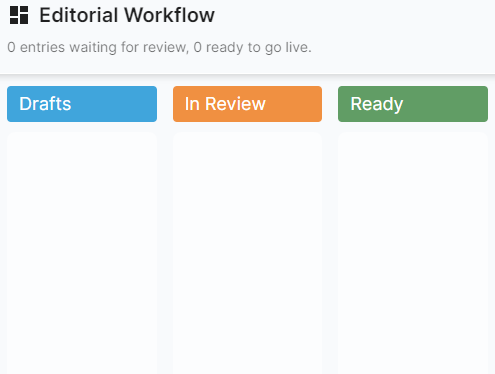
publish_mode: editorial_workflow加這行會開啟 Static CMS特有的編輯工作流,雖然改狀態很麻煩,但如果你想要有儲存草稿功能建議添加這行
fields#
 - { label: "Title", name: "title", widget: "string" }
      - { label: "Subtitle", name: "subtitle", widget: "string" }
      - { label: "Publish Date", name: "date", widget: "datetime" }
      - { label: "Featured Image", name: "feature", widget: "image" }
      - { label: "Body", name: "body", widget: "markdown" }
- { label: "Tags", name: "tags", widget: "list", field: { label: "Tag", name: "tag", widget: "string" } }colletctions/post底下的 filelds 就是文字編輯器上編輯 markdown 屬性的地方,請依據自己用的框架、部落格主題去設置這塊